Is it safe to paste work information into ChatGPT?
By vedonaiPublished
First check whether your employer allows the tool and this kind of task. Then read what you are about to send. If it contains customer information, private employee details, internal plans, passwords or anything confidential, do not put it into a personal AI account. You can often ask for help with a made-up example or a blank template instead.
The email without the customer file
Say you need to explain a price increase in a renewal email. A real account record may include a name, account number, contract price and billing details. Those fields do not belong in a personal AI chat just because you want help with the wording.
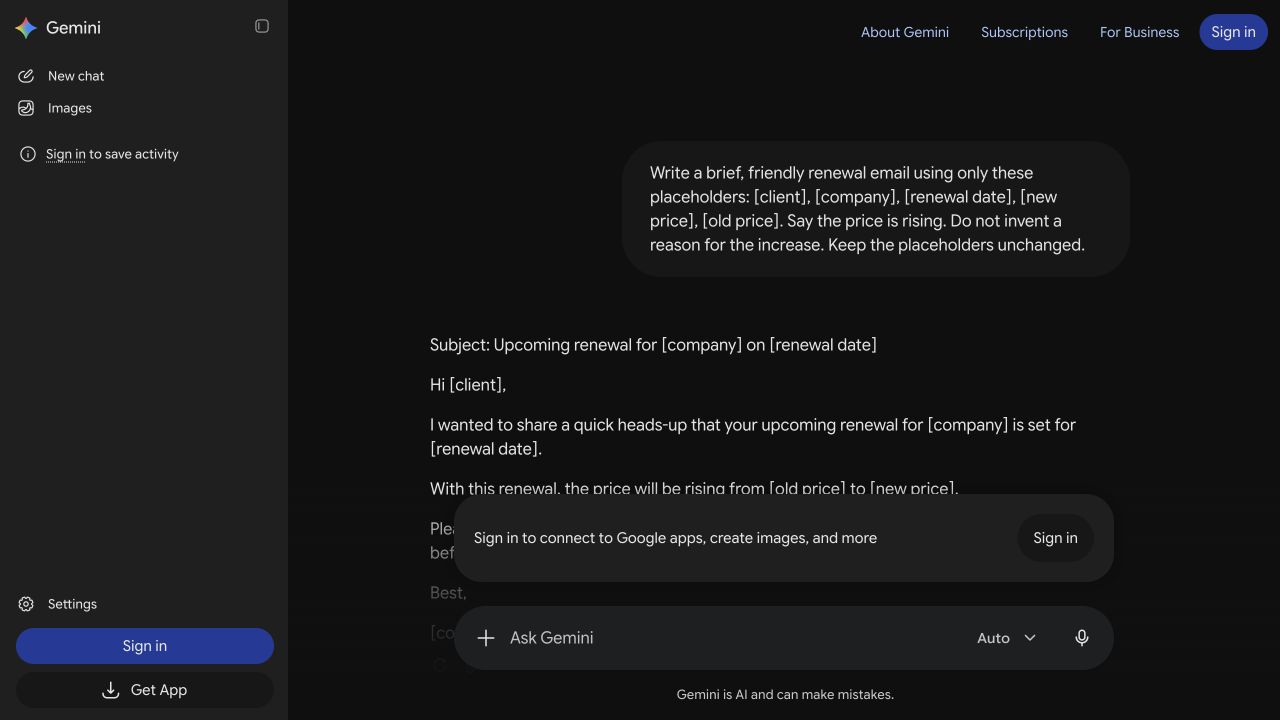
Customer record, account number, exact prices, card details and the draft contract.Do not paste the record and ask the AI to remove sensitive details. By then, you have already sent them.Write a brief, friendly renewal email using only these placeholders: [client], [company], [renewal date], [new price], [old price]. Say the price is rising. Do not invent a reason for the increase. Keep the placeholders unchanged.Gemini wrote a short email and kept all five placeholders. Its first line was “Hi [client],” and it described the rise from [old price] to [new price]. No customer record was sent.Edit any stiff lines, then fill in the real details inside your approved email system.
Training settings are one part of the decision
OpenAI says personal ChatGPT users can turn off “Improve the model for everyone” in Data controls. It also says content from ChatGPT Business, Enterprise and Edu workspaces is not used for model training by default. Those are useful distinctions. Neither tells you what your employer permits you to upload.
This is the confusion people raise in workplace privacy discussions: it is easy to paste a document, code or a customer note before noticing what is inside. Treat the send button as the moment the information leaves your work system.
Three questions before you send
- Is this tool approved for this task?Check your company's policy or ask your manager or IT team. An approved work account may have different controls from your personal account.
- Could this text reveal someone or something private?Check names, contact details, IDs, health or pay information, unpublished plans, source code, contract terms and attachments. A combination of harmless-looking details can still give away who or what you mean.
- Can I ask without the real material?Write a fictional scenario or a blank template yourself. If the task needs the real document, use only a tool and workflow your employer has approved for it.
Ask for the shape of the email
Draft a short, friendly email about [general situation].
Use [client], [date] and [amount] as placeholders.
Do not invent a reason or promise I have not given you.
Leave the placeholders for me to fill in later.
Write the general situation from memory. Do not paste the original message and ask the model to clean it. When the draft comes back, check every claim and fill in details only where your work rules allow.
Two shortcuts that fail
- “I turned training off, so I can paste it.” That setting addresses model improvement. It does not change your employer's sharing rules or make a personal account an approved work tool.
- “I removed the name, so it's anonymous.” A job title, exact deal size, date and city might still point to one person or customer. Confidential terms are still confidential without a name.
You want help replying to a customer about a late delivery. Which request is the sensible starting point for a personal AI account, assuming your employer allows general drafting?
Right. You wrote a fictional situation before sending anything. You can add the real date later in your approved work system.
Questions
Can I paste a work document into my personal ChatGPT account if I turn off training?
Turning off model improvement changes how your chats may be used for training. It does not approve an unapproved tool or give you permission to share a work document. Check your employer's rules first.
Does ChatGPT Business use our chats to train models?
OpenAI says it does not use Business, Enterprise or Edu workspace content for model training by default. Your employer still decides which files and tasks are allowed in its workspace.
Is replacing a name with [client] enough?
Sometimes the remaining details can still identify a person or reveal confidential business information. Read the whole prompt, including attachments, before you send it.